Choosing Your Beginner Construction Analytics Stack: A Comprehensive Guide

In today’s data-driven construction industry, leveraging analytics can be a game-changer for improving project outcomes, increasing efficiency, and making informed decisions. As a beginner in construction analytics, building your initial stack might seem daunting, but with the right approach and tools, you can set a solid foundation for data-driven success. This guide will walk you through the process of choosing and setting up your beginner construction analytics stack, focusing on readily available tools and best practices.

Leveraging Existing Resources: Excel and Power BI

Before diving into new tools, it’s crucial to recognize the power of what you might already have at your disposal. If your organization uses Office 365, you’re in luck – Excel and Power BI are included in your subscription, providing a robust starting point for your analytics journey.

Excel: The Swiss Army Knife of Data Analysis
Excel remains one of the most versatile tools for data manipulation and basic analysis. Its familiar interface and wide range of functions make it an excellent starting point for:

  • Data cleaning and preparation
  • Basic data visualization
  • Quick calculations and pivot tables
  • Ad-hoc analysis and reporting

While Excel has limitations for handling large datasets or complex analytics, it’s an invaluable tool for getting started and performing initial data explorations.

Power BI: Your Gateway to Advanced Analytics
Power BI takes data analysis to the next level, offering:

  • Advanced data visualization capabilities
  • Data modeling and relationship mapping
  • Real-time dashboards
  • Integration with various data sources
  • Sharing and collaboration features

As a beginner, Power BI might seem overwhelming at first, but its integration with Excel and user-friendly interface makes it an ideal next step in your analytics journey.

Identifying Your Systems of Record

Before you can analyze data, you need to know where it’s coming from. In construction, several key systems typically serve as the primary sources of valuable data:

Enterprise Resource Planning (ERP) System

Your ERP system is the backbone of your organization’s data infrastructure. It typically handles:

  • Financial data
  • Resource allocation
  • Inventory management
  • Procurement information

Identifying your ERP system and understanding its data structure is crucial for integrating it into your analytics stack.

Customer Relationship Management (CRM) System

While not always associated with construction, a CRM system can provide valuable insights into:

  • Client interactions and history
  • Sales pipeline and forecasting
  • Marketing campaign effectiveness
  • Customer satisfaction metrics

Project Management System

This is where the rubber meets the road in construction analytics. Your project management system likely contains:

  • Schedule data
  • Resource allocation
  • Task progress and milestones
  • Budget vs. actual cost tracking
  • Change orders and RFIs

Safety Compliance Platform

Safety is paramount in construction, and your safety compliance platform holds critical data on:

  • Incident reports
  • Safety training records
  • Compliance documentation
  • Risk assessments

Understanding these systems and the data they contain is essential for building a comprehensive analytics strategy.

Setting Up Your Data Infrastructure

With your data sources identified, the next step is to create a centralized repository for all this information. This is where a data lake or data warehouse comes into play.

Choosing Between Azure and Neon


For beginners, two popular options for setting up a cloud-based data infrastructure are Microsoft Azure and Neon.

Azure Data Lake Storage:

  • Seamless integration with other Microsoft tools
  • Scalable and secure
  • Supports various data types and formats
  • Offers advanced analytics capabilities

Neon (PostgreSQL Database):

  • Open-source and cost-effective
  • Serverless architecture for easy scaling
  • Optimized for analytical workloads
  • Supports SQL queries for data analysis

The choice between Azure and Neon often depends on your existing infrastructure, budget, and specific needs. Azure might be the natural choice if you’re already heavily invested in the Microsoft ecosystem, while Neon could be more appealing if you’re looking for a lightweight, cost-effective solution.

Setting Up Your Data Lake/Warehouse

Regardless of your choice, the process of setting up your data lake or warehouse typically involves:

  1. Creating your cloud account and configuring security settings
  2. Designing your data structure (schema for a warehouse, or folder hierarchy for a lake)
  3. Setting up data ingestion processes from your systems of record
  4. Implementing data transformation and cleaning procedures
  5. Establishing data governance policies

This step might require assistance from IT professionals or data engineers, especially if you’re dealing with large volumes of data or complex integrations.

Connecting to Power BI

With your data centralized in a lake or warehouse, the final step is connecting it to Power BI for analysis and visualization. Power BI offers native connectors for both Azure and PostgreSQL databases, making this process relatively straightforward:

  1. Open Power BI Desktop
  2. Click on “Get Data” and select your data source (Azure or PostgreSQL)
  3. Enter your connection details and credentials
  4. Select the tables or data you want to import
  5. Use Power Query to clean and transform your data as needed
  6. Create relationships between different data tables in the model view
  7. Start building your visualizations and dashboards
  8. Best Practices for Beginners

As you embark on your construction analytics journey, keep these best practices in mind:

Start Small: Begin with a specific problem or question you want to solve. This focused approach will help you learn the tools without getting overwhelmed.

Prioritize Data Quality: Ensure your data is clean, consistent, and accurate. Poor data quality can lead to misleading insights.

Collaborate Across Departments: Work with project managers, finance teams, and field personnel to understand their data needs and challenges.

Invest in Learning: Take advantage of free resources, tutorials, and courses to improve your skills in Excel, Power BI, and data analysis.

Iterate and Improve: Your first attempts at analytics might not be perfect, and that’s okay. Continuously seek feedback and refine your approach.

Consider Data Security: Construction data often includes sensitive information. Ensure you’re following best practices for data security and compliance.

Conclusion

Building your beginner construction analytics stack doesn’t have to be complicated or expensive. By leveraging existing tools like Excel and Power BI, identifying your key data sources, setting up a centralized data repository, and following best practices, you can create a powerful foundation for data-driven decision-making in your construction business.

Remember, the goal is not to become a data scientist overnight, but to start harnessing the power of your data to improve project outcomes, increase efficiency, and gain a competitive edge. As you grow more comfortable with these tools and processes, you can expand your analytics capabilities, potentially incorporating more advanced techniques like machine learning and predictive analytics.

The construction industry is evolving, and those who can effectively leverage data will be best positioned for success. By taking these first steps in building your analytics stack, you’re not just improving your current operations – you’re future-proofing your business for the data-driven era of construction.

Data Engineering for Construction: Unlocking the Power of Your Information

Photo by Anamul Rezwan on Pexels.com

As a construction company managing multiple SaaS tools for project management, scheduling, job site safety, and time and materials reporting, you’re sitting on a goldmine of data. But are you making the most of it? This is where data engineering comes in.

What is Data Engineering?

Data engineering is the practice of designing, building, and maintaining the systems and infrastructure that collect, store, and process data at scale. It’s the foundation that enables effective data analysis and business intelligence.

Why Does It Matter for Construction?

  1. Integration of Multiple Data Sources Your various SaaS tools are likely generating data in different formats and storing it in separate systems. Data engineering can help you bring all this information together, giving you a complete picture of your operations.
  2. Real-time Insights With proper data engineering, you can transform raw data from your job sites into real-time insights, allowing for quicker decision-making and problem-solving.
  3. Predictive Analytics By centralizing and structuring your data, you open the door to advanced analytics. This could help predict project delays, safety risks, or cost overruns before they occur.
  4. Data Quality and Consistency Data engineering ensures that the information flowing through your systems is accurate, consistent, and reliable – crucial for making informed decisions.
  5. Scalability As your company grows and takes on more projects, data engineering provides the framework to handle increasing volumes of data without sacrificing performance.

Key Components of Data Engineering

  1. Data Pipeline Development Creating automated processes to extract data from your SaaS tools, transform it into a usable format, and load it into a central repository.
  2. Data Warehousing Designing and implementing a centralized storage solution optimized for analysis and reporting.
  3. Data Modeling Structuring your data in a way that reflects your business processes and enables efficient querying.
  4. ETL (Extract, Transform, Load) Processes Developing routines to regularly update your data warehouse with the latest information from your various tools.
  5. Data Governance Establishing policies and procedures to ensure data quality, security, and compliance with regulations.

Getting Started

Implementing a data engineering strategy doesn’t have to be overwhelming. Start by:

  1. Assessing your current data landscape
  2. Identifying key data sources and potential integration points
  3. Defining your data goals and requirements
  4. Exploring data engineering tools and technologies that fit your needs
  5. Considering partnering with data engineering experts to develop a tailored solution

By embracing data engineering, your construction company can turn the wealth of information generated by your various SaaS tools into a powerful asset, driving efficiency, safety, and profitability across your operations.

How one contractor uses NYC Department of Buildings(DOB) permit requirements to drive inspections in the field with Procore

On your job site, especially if you’re in New York City, you’ll need to ensure your team complies with all of the requirements listed in each trade’s work permit. But, getting the status of any given permit on a job is a cumbersome process, and keeping track of what’s left to address is even more challenging. It takes a highly diligent superintendent or project manager to stay on top of the requirements at any point in the job and communicate them to the field. 

Below is how an NYC contractor used data integration to save several hours per week of coordination and data-entry.

Challenge

The contractor was looking to reduce the amount of data entry required each week to pull updated permit status and required inspection items, and then relay that data to the field. Before this solution came online, their process was:

  • Check the NYC DOB NOW website for permit status and required items.
  • Create a new inspection template for each project in Procore and add the required items for each permit as sections.
  • Communicate with the field to complete the inspection.
  • And, if any of the required items changed…repeat the process.

Solution

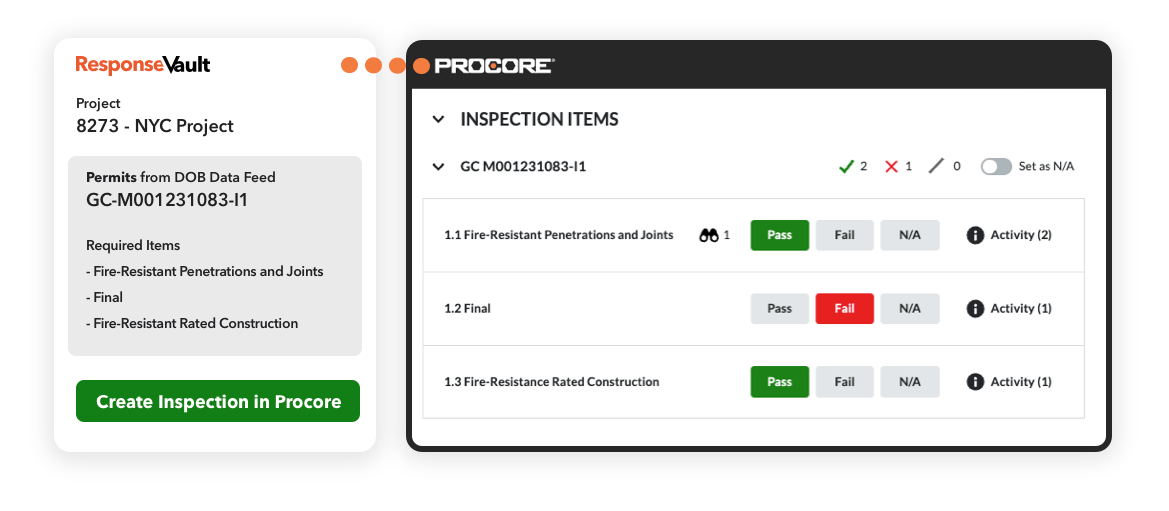
The contractor worked with data engineering firm, ResponseVault, to create both the integrations between the NYC DOB NOW website, and Procore Inspections, but also to create a management screen for every project. 

The integration loads the database of permit information from the DOB into a data warehouse, then lets the contractor’s team choose which permits they want to track per project. When it’s ready, it will trigger an inspection to be created for the project in Procore, including each permit and a line item for each open requirement for the field to respond to.

How does this work? 

First, the integration team uses the NYC Open Data Portal to periodically extract and load permit data from the DOB into a PostgreSQL data warehouse. This process happens each day, as the dataset is updated daily. The data has two columns (fields) that contain the information we’re looking for in each permit. They are Special Inspection Requirement and Progress Inspection Requirements. The data in those columns is a comma-separated list of requirements for the permit to move forward. A typical value may look like “Fire-Resistant Penetrations and Joints, High-Pressure Fuel-Gas Piping (Welding).” 

ResponseVault takes the data in its raw form, transforms each requirement into a separate record, and presents the contractor’s team with a management interface that includes the project information, a list of each of the permits relevant to that project, and a list of all requirements for each permit.

As the job is in progress, the contractor’s staff in the office can trigger a workflow that creates a customized Procore inspection with sections for each permit and the requirements as entries. The inspection is unique to the project and generated through an automated process that leverages the information in the data warehouse.

The inspection with up-to-date permit data from the data warehouse and attachments uploaded by office staff is now ready to be completed by the field. With this integration, the contractor can reduce data entry and communication time with the field by 60% weekly. 

If you’re looking to integrate permit information or other project data with your project management system, contact the ResponseVault team.

3 Approaches to Data Engineering in the Construction Industry

For many firms, there are more questions than answers on how to begin analyzing and using data. A good place to start is understanding where you are in this process. Here’s a high-level look at three states of progression in the journey toward data analysis most firms go through that can serve as a road map to help you move forward.

Understanding where you’re at in capturing and using data is a good way to build a road map to the future.

Two years ago, the president of Primus Builders knew he had a data-analysis problem, but he had no idea how big that problem actually was. All he really knew was that none of his tech solutions were “talking” to one another, leaving him with islands of data and redundant workarounds. Then he called in an expert and realized his problem was much worse.

That’s because Primus Builders was where a lot of construction firms are on their data-analysis journey — siloed point solutions. In practice, that meant the company was wasting money on technology it no longer used — and hadn’t been for years — without anyone realizing it. It also meant workers were duplicating efforts to produce reports, but the information in those reports often conflicted because there was no single source of truth. Finally, it meant the company was at risk for hacking, ransomware attacks and other security breaches.

“The problem that a lot of people have is how do I get these applications to talk? How do I take my financial data and combine it with my schedule and my project management? There’s not really a clean way to do it,” said John Robba, chief technology officer for Primus Builders. “But collecting data is one thing. The real question is, what do you do with it? And that’s usually the hardest thing for companies to answer. So, the first thing is knowing what’s the goal you’re trying to accomplish? Then you can back into the details, and it will be very apparent if you selected the right partnerships and have the right internal resources to pull that off.”

Before any of that happens though, Robba and others say it’s important to have a clear understanding of where your company is in its data-analysis journey — and how to move forward.

But for commercial construction firms looking to start a data-analysis journey — and capitalize on the promise of data analytics—the path is anything but clear. FMI reports that 96% of data collected in the engineering and construction industry goes unused.

That’s a big mistake.

“The organizations that take the time to gather the data, analyze it and turn it into actionable insights will gain a competitive advantage. The ones that bury their heads in the sand and hope it goes away will be quickly left behind,” warn the FMI report experts.

For many firms, there are more questions than answers on how to begin analyzing and using data. A good place to start is understanding where you are in this process. Here’s a high-level look at three states of progression in the journey toward data analysis most firms go through that can serve as a road map to help you move forward.

Understanding Three Basic Approaches to Data Analysis — and Where You’re at on Your Journey

Step 1: Data Collected in siloed point solutions

What it looks like: Companies in this scenario typically use multiple apps and tech tools to gather data. Although processes are being digitized, the apps and tools don’t integrate with one another, and thus, data becomes siloed in the various solutions. That means that to get a report, someone has to manually go into the different tools or apps and export the data. In fact, 42% of companies use four to six apps on their construction jobs, and 27% report that none of those apps integrate with one another. As a result, data is transferred manually nearly 50% of the time, according to the 2020 JBKnowledge Construction Technology Report.

Why it creates problems: It’s not just the siloing and manual data transfer that are problems. Using multiple apps and tools also means workers have to sign in and navigate multiple passwords, interfaces and hardware. Because of that friction, workers sometimes simply don’t use the tools at all. Even if there is consistent use of the tech tools, someone ends up spending a lot of time trying to figure out if the data is consistent and updated. Answering the question, “What happened on the job site today?” becomes a data wrangling challenge, instead of a quick and easy answer.

How to move forward: Rather than manually pulling data from individual apps to run reports, companies can begin using a data warehouse or data lake to pull in data from the various apps and tools, which can then be used to run reports. This data integration can be almost instantaneous and automatic. But these products and services can also be pricey. Another option for firms with capable IT departments is to create an in-house data warehouse using services such as Amazon Web Services. Either way, companies can start small with incremental steps and grow from there.

Step 2: Arguments over conflicting data: “Who’s right?”

What it looks like: Just as it sounds, this scenario finds two or more workers arguing over whose data is correct. For example, the field might have a different data point for hours worked than the office. Companies in this stage often have started to integrate and automate data capture, but they haven’t yet developed systems and approaches to ensure a single source of truth.

Why it creates problems: Without that single source of truth, trust in the system is lost, and buy-in from executives in the C-suite, all the way down to the field workers, is lost with it. When that happens, even the best tech tools and integration won’t produce useful data because people aren’t taking the time to input it. That’s more than just academic. Fully 52% of rework is caused by poor project data and miscommunication, meaning $31.3 billion in rework was caused by poor project data and miscommunication in the U.S. alone in 2018, according to an FMI/Autodesk report.

How to move forward: The solution to this problem is something called metadata — a set of information that describes and gives information about other data. In practice, this means that definitions must be provided for data in the user interface or dashboard. For example, what is the specific definition for hours worked? This question may seem obvious, but without clear definitions, workers may make assumptions that corrupt the data. Once data is defined with metadata, companies must implement a data-documentation system that verifies where the data is coming from and how it gets input. This process is known as data lineage. Data lineage includes the data origin, what happens to it and where it moves over time. Data lineage provides visibility into data and simplifies the ability to trace errors back to the root cause.

Step 3: Enterprise-wide data accessibility

What it looks like: Companies in this phase of the data-analysis journey can run data reports and view data dashboards quickly and easily. The data is secure and reliable, and there is a trusted single source of truth. That in turn allows companies to use different tools that they wouldn’t otherwise because all the inputs are readily available. For example, with BIM, changes can be made in a 3D render using real-time job site data. That means if an architect or owner wants to make a change, a cost analysis can not only be done in real time, but also based on how your project’s going at that point in time. And most importantly, there is a clear process for resolving discrepancies. The best companies use a combination of documentation, monitoring tools, and a dedicated support team to maintain data accuracy, but also allow stakeholders to avoid making judgements on inaccurate data.

Why it works: Because these companies see real-time data, they can use that insight to make actionable decisions about day-to-day operations that lead to greater efficiency and profitability. Questions that used to take hours or days to get answers can now be cleared up in seconds. This ability allows companies to be more aggressive and creative with different building scenarios that lead to still greater efficiency and cost savings. More time gets spent on high-value efforts rather than trying to find and massage data. Everyone in the organization is able to confidently and accurately answer the question, “What happened on the job site today?” The benefits of being able to answer that question (and others like it) are obvious to most contractors. In fact, 70% of contractors believe that advanced technologies can increase productivity (78%), improve schedule (75%) and enhance safety (79%), according to the 2019 USG + U.S. Chamber of Commerce Commercial Construction Index.

How to fully capitalize on it: Companies that have moved into this realm haven’t had to reinvent the wheel. Most other industries have made headway on how to move to enterprise-wide data accessibility, and a number of tools, services and products exist to help. Like Primus Builders, these companies have also prioritized data analysis by hiring experts to help them untangle the different apps and tools they use and develop a cohesive data-analysis strategy. No one tool or hire will solve this problem; it has to be an organization-wide initiative that plays to everyone’s strengths.

Moving Forward on Your Journey

Clearly, enterprise-wide data accessibility could benefit all contractors. But getting there requires a new way of thinking about building — and knowing when and from whom to ask for help along the way. The good news is that contractors don’t have to figure it all out immediately. They can move in the direction of enterprise-wide data accessibility in incremental steps. They can also look to other industries and experts for support and guidance.

The most important thing, though, is to start moving in the direction of enterprise-wide data accessibility — before it’s too late. Some topics to research moving forward:

  • Hiring a data team.
  • Understanding where data came from with data lineage.
  • Understanding why data may appear inaccurate with data observability.
  • Understanding how data is defined with a data dictionary.

“We’ve seen many customers come in with pieces of the puzzle, but they need help with staffing and tooling to put the full picture together,” explained Matt Monihan, CEO of ResponseVault, a data engineering firm that specializes in the construction industry.

Ultimately, experts like Robba warned getting that full picture is becoming more and more vital to not only remaining competitive, but also surviving.

“Wake up, because you’re already living the nightmare. You’re already in the weeds, you just don’t know how tall the weeds are or even where the road is, or how far it is to the road to get out of the weeds,” Robba said. “Most people running organizations are going a million miles an hour. And data analytics is one of those things where you have to have the expertise. And then you actually have to take the time to sit down and go, ‘Yes, I’m going to focus on this and put an action plan together.’ But the bottom line is, you need to invest in your future now, because your competition definitely is.”